

Aura Farming AI Video Generator
Upload one photo — the trend-style prompt, model and vertical format are pre-filled. Generate your Korean aura farming clip — K-drama classroom or neon corridor — in minutes, free to try.
New accounts receive 30 welcome credits, enough for up to 1 clip with the default Seedance 1.0 Pro Fast preset at 30 credits per 5-second 480p clip. Sign-in and a sufficient credit balance are required. Other models or settings can cost more; review the quote before confirming. Pricing · Models
Aura farming AI makes a calm, confident character moment from a photo. This recipe uses a classroom entrance, a slow walk and a look toward the camera; you can change the setting to a city street or a neon corridor. Upload one clear portrait and keep one main action in the prompt. The scene is newly generated rather than a replacement inside footage from a particular show. Compare the examples below to choose lighting and camera movement before making your own clip.
Aura farming scene ideas
The classroom and street examples were generated from text; the corridor example used a reference image. Recorded inputs and model settings appear below. These examples do not promise the same result from the starter preset.
The examples use the models shown below, which can differ from the starter preset. Current quotes are not historical charges, and availability can change. Use prompt copies only the text; your model, settings and photos stay selected. Outputs vary, and selected examples do not establish a success rate.
Classroom entrance: a text-generated scene with backlight and a slow camera move. Use the setting as a prompt idea for your portrait.
Sora 2
4s · 720p · 9:16
Output: 4.00s · 720×1280
Text prompt; no reference photos
Current quote: 265 creditsRecord verified (UTC): 2026-10-16
Recorded prompt
The person in contemporary clothing sits at a desk in a sunlit Korean-style classroom, looks around slowly, then stands up and walks toward the camera, glances back over their shoulder, and stops facing the camera with a calm confident stare and a faint glow of light behind them, afternoon backlight with dust motes, slow push-in, cinematic slow motion, film grain, photorealistic, vertical 9:16 composition
Golden-hour street: a text-generated walking scene. A single walk and a steady gaze keep the action easy to describe.
Grok Imagine Video 1.5
3s · 720p · 9:16
Output: 3.04s · 720×1280
Text prompt; no reference photos
Current quote: 230 creditsRecord verified (UTC): 2026-10-16
Recorded prompt
The person in contemporary clothing walks toward the camera in slow motion through golden-hour backlight on a quiet city street, long shadows and soft lens flare, coat moving in the breeze, calm confident expression, the city street replaces the photo background entirely, cinematic, photorealistic, vertical 9:16 composition
Neon corridor: an image-reference example with cool lighting and a slow approach. Its reference photo and settings are listed below.
Hailuo 2.3
6s · 768p · 9:16
Output: 5.88s · 578×1028
AI-generated reference photos: 1
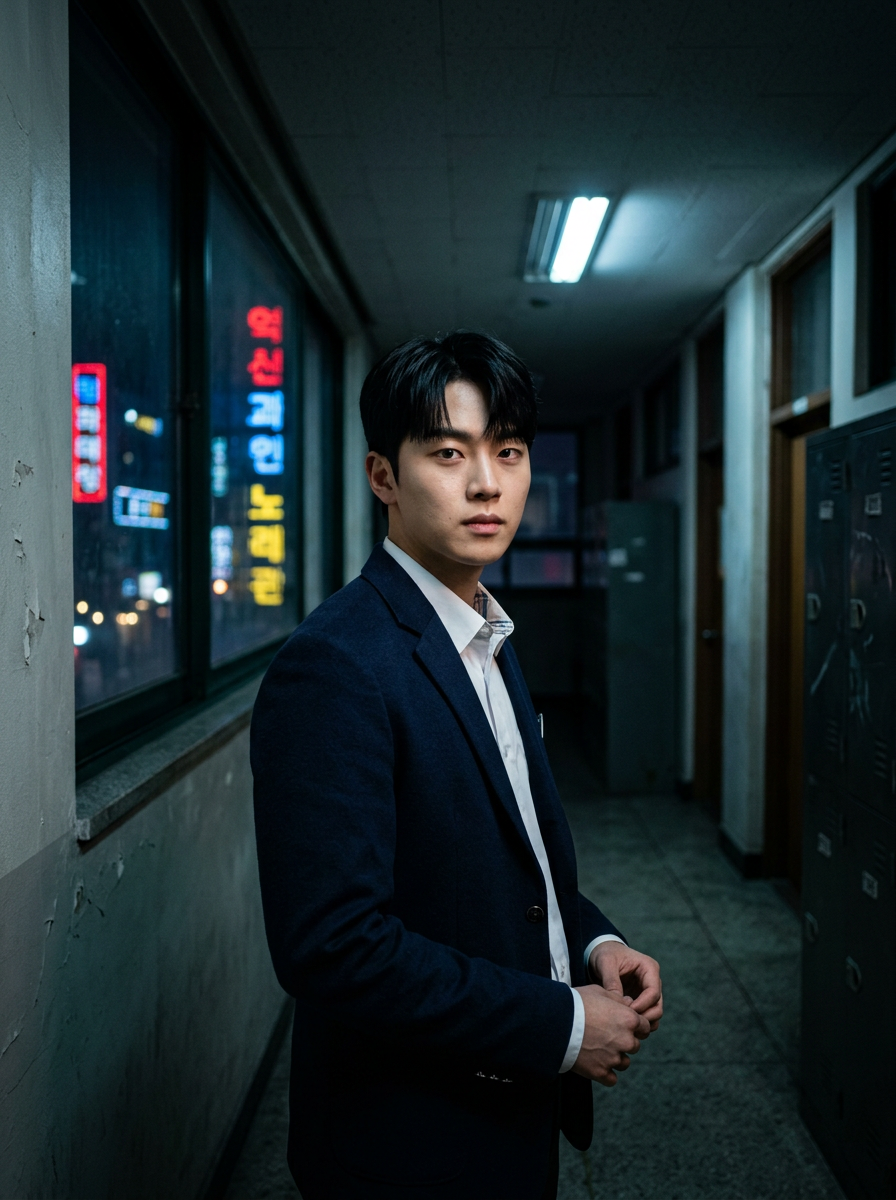
Record verified (UTC): 2026-10-16
Recorded prompt
The person from the reference photo walks slowly toward the camera down a rain-slicked school corridor at night, neon signs glowing through the windows behind them, coat swaying with each step, then stops and stares straight into the lens with intense calm eye contact, low-angle tracking shot, cinematic slow motion, K-drama main-character lighting with cool blue and magenta rim light, film grain, photorealistic, vertical 9:16 composition, keep the face exactly as in the reference photo.
How it works
- 1
Upload one photo — a clear, frontal shot of one person works best
- 2
The trend-style prompt template comes pre-filled; tweak the scene or leave it as is
- 3
Generate with starter credits — the default preset outputs a 9:16 vertical clip
- 4
Download the MP4, then add a trending K-drama sound from TikTok or Reels when you post
Who is this tool for?
Ride the trend while it's hot
The Korean drama-style classroom edit is climbing right now — post your version early while the audio is still peaking on TikTok and Reels.
Solo classroom edits
One photo is all it takes: your look-around, walk-up and staredown become a ready-to-post vertical clip.
Three scenes, one recipe
The gallery prompts move the same aura to a golden-hour street walk and a Korean drama-style neon corridor — swap the scene in one sentence.
Scroll-stopping hooks
Open a longer video with the main-character format: the slow push-in and staredown stop thumbs in the first second.
Free to try, no subscription
New accounts receive 30 welcome credits, enough for up to 1 clip with the default Seedance 1.0 Pro Fast preset at 30 credits per 5-second 480p clip. Sign-in and a sufficient credit balance are required. Other models or settings can cost more; review the quote before confirming. We do not add our own visible watermark; provider provenance signals may remain.
What should you know before you start?
What does aura farming mean on this page?
Here it means an edit built around quiet confidence: a slow entrance, composed posture and a deliberate look at the camera. The AI recipe turns that idea into an original short scene from your photo.
How do I make a Korean drama-style aura farming video?
Upload one clear portrait and start with the classroom prompt. Describe the lighting, one action and a camera move. For a different mood, change the classroom to a neon corridor or a golden-hour street without adding a long sequence of shots.
Is the aura farming AI video generator free?
New accounts receive 30 welcome credits, enough for up to 1 clip with the default Seedance 1.0 Pro Fast preset at 30 credits per 5-second 480p clip. Sign-in and a sufficient credit balance are required. Other models or settings can cost more; review the quote before confirming.
Does this recreate a specific show or actor?
No. The recipe describes an original scene with cinematic lighting and movement. It does not supply show footage or an actor replacement. Use a photo of yourself or someone who has agreed to appear.
Which portrait works best?
Start with one well-lit person facing the camera, with the face visible. Avoid group photos, strong side angles and hands covering the face. A simple portrait gives the model fewer competing details to change.
Does the aura farming video include music?
The default recipe creates a silent MP4. Add music in your editor or when posting, using audio you have permission to use. Music availability and usage rights vary by platform and account.
What should I change if the walk or face looks wrong?
Shorten the action to one slow walk or a head turn, remove competing camera instructions and try again with a clearer reference. You can choose another model after checking its credit cost; exact facial details and choreography may still vary.
Ready to create your first AI video?
Start free with starter credits — no watermark on downloads, and upgrade anytime for higher resolutions and premium models.
For a more expressive camera-facing performance instead of a slow cinematic entrance, compare the Bulin 47 freestyle workflows.