

YOUR BROWSER. YOUR CREATIVE SPACE.
AI video creation.One browser extension.
Turn product images, articles and ideas into short AI clips. Capture inspiration, create in the side panel and keep your materials in one place.
Free to install · AI generation uses credits
Selected by you
One connected workspace
Clear before you create
From a spark to a shot.
Four ways to create, without losing your place. Choose a workflow to see the extension in action.
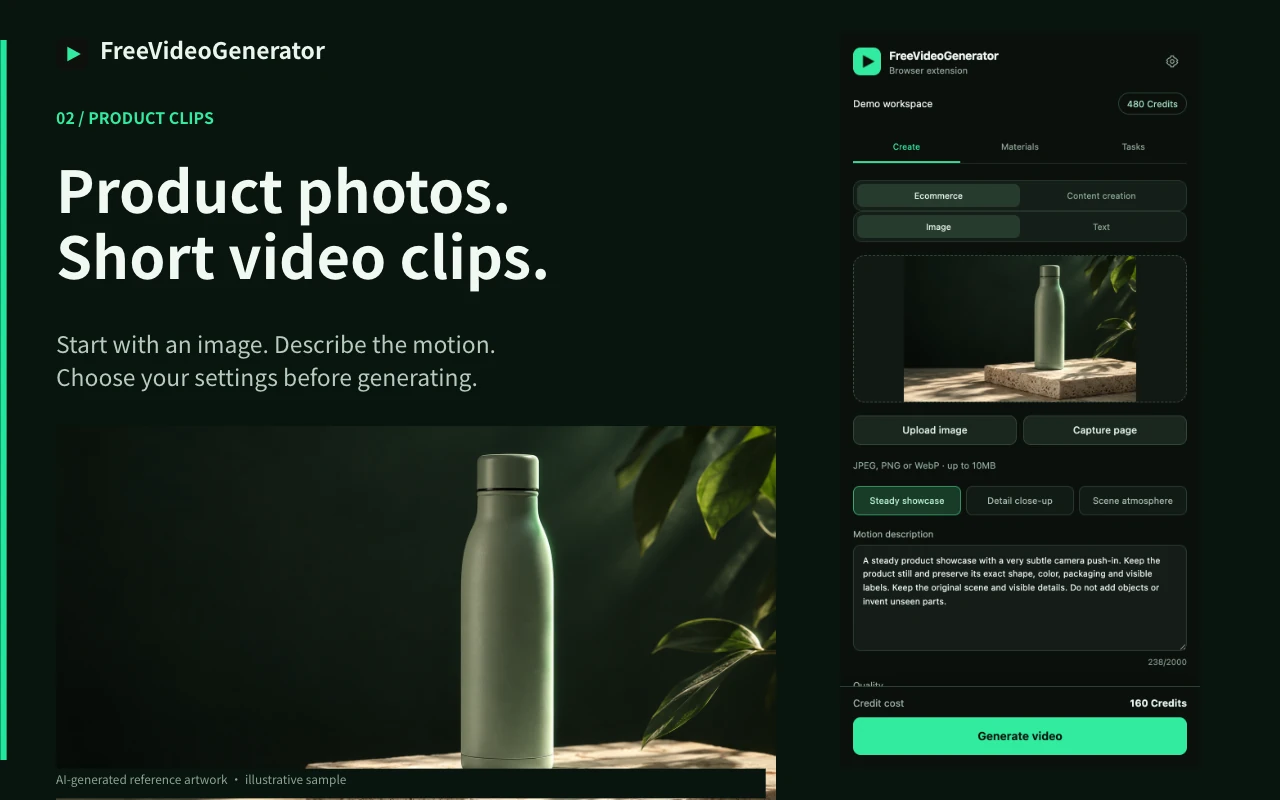
Give your product a little motion.
Start with a product image. Choose a steady showcase, a detail close-up or an atmospheric scene, then review your prompt and settings.
Actual extension UI with demo data. Previewing does not start a generation.
Your first clip starts here.
- 01
Install & pin
Add the extension from the Chrome Web Store and pin it to your toolbar for easy access.
- 02
Connect your account
Open the side panel and connect your FreeVideoGenerator account with a verified email. Your existing credits and materials come with you.
- 03
Create your first clip
Choose an image or write a prompt, review the credit quote and generate. Track the task, then preview or download the MP4.
Your ideas. Your control.
Choose what to save, review what to send and see the credit cost before you generate.
Selected by you
Page capture and article reading start when you request them. Review source text before asking for AI suggestions.
One connected workspace
Use the same account, credits, saved materials and task history in the extension and on the website.
Clear before you create
AI generation uses credits. Review each quote before submission and revoke browser access from your account settings.
A few things to know.
Is the extension free?
The Chrome extension is free to install. Cloud features require a connected account with a verified email. AI image and video generation use account credits, with the cost shown before you submit.
Can I install it on my phone or in Edge?
The Chrome extension is designed for desktop Chrome. You can still use the website on mobile. An Edge installation link will appear here when its store listing is available.
Does it read every page I visit?
It does not continuously monitor your browsing. You choose the images or text to import and explicitly request page capture or article reading. Cloud saving, AI suggestions and generation send the relevant content for processing.
Does it create a complete edited video?
It creates short clips that you can preview and download as MP4. Assemble scenes, narration, captions and music in your editor. Review AI-generated product details before publishing.
Keep a video studio one click away.
Save the image. Shape the idea. Make your next clip right in the browser.
Add to ChromeFree to install · AI generation uses credits
More creator tools
Open materialsAI B-Roll Generator for Your Next Edit
Generate short AI B-roll clips from a scene description or reference image. Review the prompt and create supporting footage for your edit.
Video Hook Generator for Visual Openings
Create a visual opening clip for Shorts, Reels or TikTok. Describe one reveal or action, review the prompt and generate your opening shot.
Article to Video Clips, One Shot at a Time
Turn article ideas into short AI video clips. Paste text, review three shot suggestions and choose a prompt before generating a single clip.
Review the product shape, colors and labels before using an AI-generated clip.